

Help Section
Currency
We are only using New Zealand Dollar (NZD) as our currency for all prices.
Offering a service or job most likely requires an approval from the other party. Buying of service is assumed accepted and will not require an approval from the other party.

Make Offer
Make Offer to a Service
A Consumer can make a reasonable offer to the service provided that it allows an offer. This can be determined by the presence of Make Offer button.
The make offer notification has no guarantee for Consumer that it will be delivered to the Provider. This again depends on how the Provider would like to be notified.
Make Offer to a Job
The job owner will always be notified of all offers from different Service Provider. The offer raised by the Service Provider may or may not expire.

Buy Now
Buy Now a Service
Buy now a service will prompt the provider that a consumer has agreed to purchase the service. The advantage of making a buy now is that your request is likely to be entertain faster compare to making lesser offer. AllServices is not managing the payment of transaction and therefore you have to contact the provider in that matter.

Trading Expiration
Offer Trading Expiration
Other instance of trading is when a Service Provider will make an offer to an existing job. For this trading, we provide a more flexible setting of
expiration that only applies for a single offer. The expiration of this offer can be set while the offer is being drawn by the Service Provider, as shown in the image below.
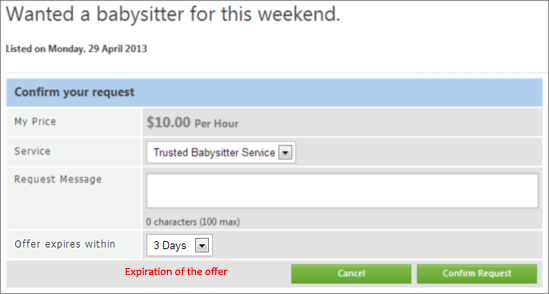
At this stage, all expiration date is not editable once the offer is submitted.
Payment Trading Expiration
The Service Provider can set the number of days on which the payment is valid. If the offer expires, trading will immediately cease and be removed from the consumers active trading.
The setting can be found under My Account > Account Information > Status & Preferences.
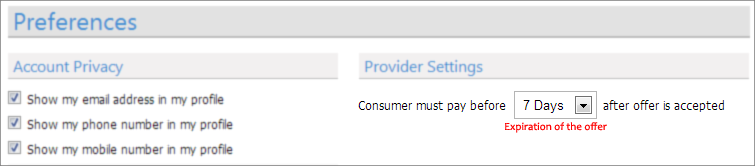
The Consumer of the service will be notified a day before the expiration period, the next notification will be when the payment has already expired.
The Consumer can check of how many days are given for the offer.
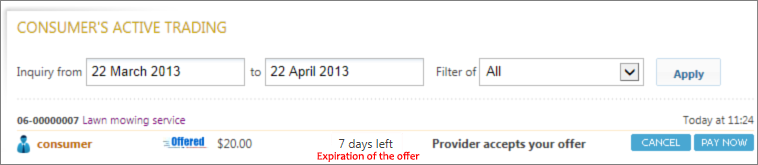
Trading Notification
The notification through email is sent on every activity of a transaction. This is important for both Consumer & Provider so that they will be immediately informed of their transaction activities.
Note
The notification of your watched service or job activities are optional and can be set through My Account > Account Information > Status & Preferences.
For security reason, the system have set a limit of 3 times, in which both the consumer and provider can set back the trading status from Complete to Incomplete or vice versa.
In cases where the change of status exceeds the limit, you need to call our support team to help you with that concern.
Tradings that are tagged as complete by providers and waiting for verification from consumers are limited to 7 days only, after the 7 days period, the trading will auto complete in favour of the provider. The 7 days period is what we believe that is reasonable enough for consumer to respond such verification.
If you have any concerns with regards to your trading and you believe you have a valid reason not being able to verify it within 7 days, please give us a call within the next 3 days to resolve this matter.
Refund Policy
Refund is between consumer & provider to discuss.
Consumer Guarantees Act
The link below will redirect your browser to Consumer Affairs website.
Ratings
Every time a service is completed, the Consumer is entitled to provide a fair review & rate to the Service Provider. The rating is sometimes confusing for many and therefore
this legend will serve as a best guide so that our members will be able to have similar interpretation to everyone who will be using this website.
Legend